Amazon SEO lives and dies by keyword research. Before you optimize a title, write a bullet, or bid on a campaign, you need to know the exact words shoppers type when they're ready to buy your product — and where you rank for them today. This guide walks through how Amazon's search engine actually works, how to build a keyword list that converts, where to place those keywords, and how to measure the results with the Asgard Amazon API and the free Amazon keyword rank tracker.
Quick answer
- Amazon is a buyer's search engine, not Google. Intent is transactional — every keyword is someone about to spend money.
- Relevance + conversion win. Amazon ranks the products most likely to sell for a term, not the ones that merely mention it.
- Prioritize by volume × relevance × winnability, not raw search volume alone.
- Place keywords once, in the right fields: title, bullets, backend search terms — no stuffing.
- Track rank per keyword (organic + sponsored, by zip, mobile + web) with the Asgard rank tracker.
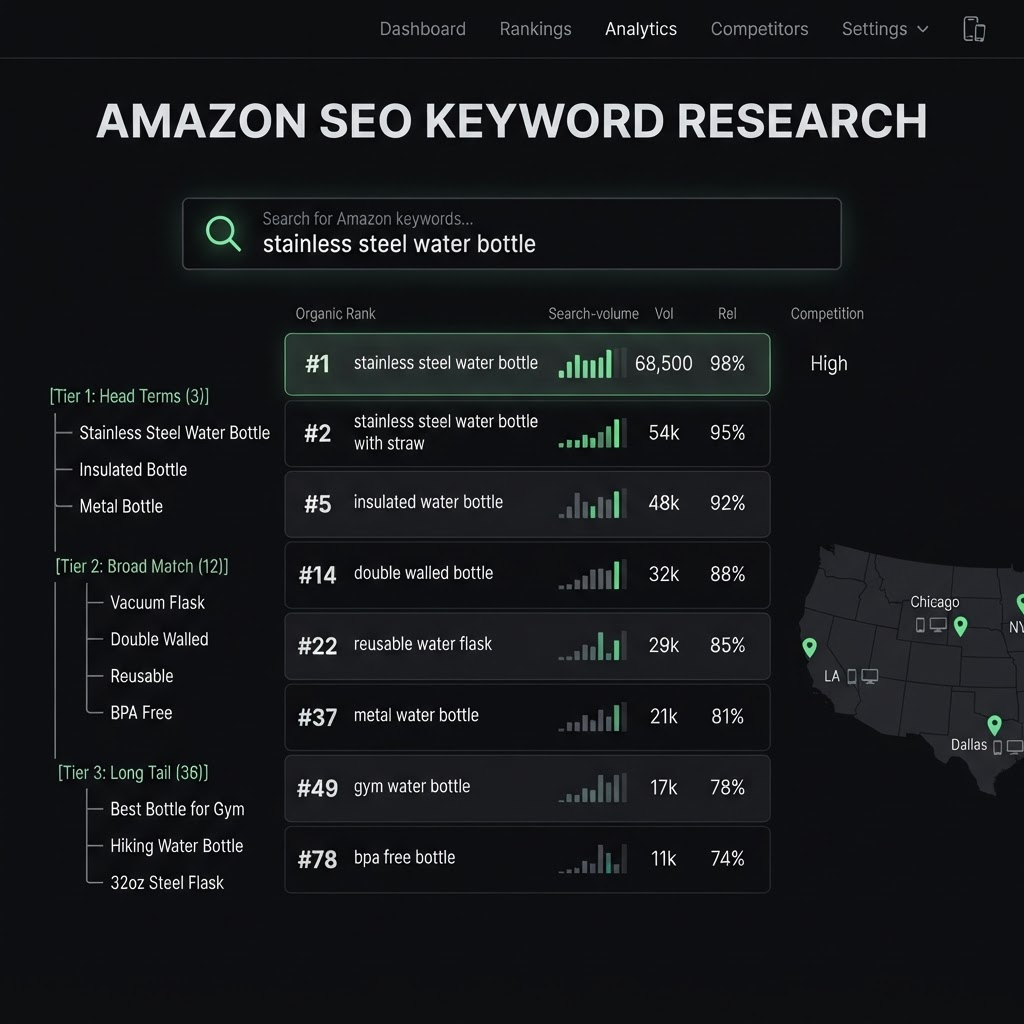
How Amazon search actually works
Amazon's search engine is fundamentally different from Google. A Google searcher might be researching, comparing, or just curious. An Amazon searcher is almost always a buyer — they've opened a store and typed what they want to purchase. That single fact shapes everything about keyword research: your job isn't to attract traffic, it's to match high-intent buyer language and then convert it.
Amazon's algorithm weighs two things above all: relevance (does the listing match the query?) and performance (do shoppers who see it click and buy?). Keywords establish relevance — you can't rank for a term you don't include. But once you're relevant, sales velocity and conversion rate on that term decide how high you climb. This is why keyword research and listing optimization are the same project: the words get you into the race, the conversions win it.
Step 1 — Build your seed list
Start with the obvious: how would you search for this product? Write down the core descriptive terms, then expand from real-world sources rather than your imagination:
- Amazon autocomplete. Start typing your core term in the Amazon search bar and record every suggestion — these are real, popular queries.
- Competitor listings. Look at how the top-ranked products for your category word their titles and bullets. Their keyword choices are battle-tested.
- Your own reviews and Q&A. Customers describe your product in their own words — often phrases you'd never think to target.
- Category and subcategory names. The way Amazon organizes the catalog hints at the terms it associates with your product.
- Emerging social terms. Creators coin nicknames and use-cases that shoppers then search on Amazon. Pull them from TikTok captions and comments with the Asgard TikTok API to catch tomorrow's high-volume keywords early.
Step 2 — Segment keywords into tiers
Not all keywords deserve the same treatment. Sort your seed list into three tiers so you know where each one belongs:
- Core "bullseye" terms. The head keywords that precisely describe the product (e.g. "cork yoga mat"). Highest volume, highest competition — these belong in your title and are your primary rank-tracking targets.
- Long-tail terms. More specific, lower-volume phrases with clearer intent ("extra thick cork yoga mat non slip"). Less competition, higher conversion — perfect for bullets and backend terms, and easier early wins.
- Adjacent & seasonal terms. Related needs ("home workout gear") and time-bound queries ("fitness gift"). Rotate these through PPC and A+ content as relevance and the calendar dictate.
Step 3 — Prioritize with a simple score
Chasing the highest-volume keyword is the most common mistake in Amazon SEO. A term with 50,000 monthly searches is worthless to you if it's irrelevant or dominated by billion-dollar brands. Prioritize each keyword on three axes instead:
| Factor | Question | Why it matters |
|---|---|---|
| Search volume | How many shoppers search this term? | Sets the ceiling on traffic — but is meaningless without the other two. |
| Relevance | Does my product genuinely satisfy this query? | Irrelevant traffic doesn't convert, and low conversion kills rank. |
| Winnability | Can I realistically rank against who's already there? | Long-tail terms with weaker competition deliver faster, cheaper wins. |
The best early targets are usually high-relevance, decent-volume, low-competition long-tail keywords. Win those first, build sales velocity, and use that momentum to climb the more competitive head terms.
Step 4 — Place keywords the right way
Amazon indexes a keyword once. Repeating it across every field wastes space and reads like spam — say each important term once, in the strongest field available, and spend the rest of your space on more terms:
- Title: your most important bullseye keywords, front-loaded, while staying readable for humans.
- Bullet points: secondary and long-tail keywords woven into real benefit statements.
- Backend search terms: synonyms, spelling variants, and terms that don't fit naturally in visible copy. No commas needed, no repeats.
- A+ content & images: not indexed for text, but they lift conversion — which feeds the rank of the keywords you are indexed for.
Step 5 — Track rank and iterate
Keyword research isn't a one-time task — it's a loop. Once your keywords are placed, you have to measure where you actually rank and refine from there. This is where the Asgard Amazon API and free rank tracker come in:
- Track each target keyword for both organic and sponsored position, so you separate true SEO from paid visibility.
- Lock location to a real US zip code. Organic ranks vary by zip; Asgard supports unlimited US zips and holds the same location across pulls so your trend reflects real change, not location noise.
- Split mobile vs web. The same ASIN can rank #3 on desktop and page 2 on mobile — where most Amazon traffic is. Asgard returns both SERP views.
- Watch the response after each change. Update a title or backend term, wait 24–48 hours, and re-check. Moving from #40 to #18 is a clear win; no movement means revisit the copy or the target.
Here's the search endpoint powering that loop:
const res = await fetch(
  "https://api.asgardata.com/amazon/search?" +
  new URLSearchParams({ keyword: "cork yoga mat", country: "US", zip: "10001" }),
  { headers: { Authorization: "Bearer YOUR_API_KEY" } }
);

const data = await res.json();
const rank = data.results
  .filter((r) => !r.sponsored)
  .findIndex((r) => r.asin === "B09XY12345") + 1;

console.log(rank ? `Ranked #${rank}` : "Not on page 1");
Common mistakes to avoid
- Keyword stuffing. Repeating terms doesn't help rank and hurts readability and conversion.
- Chasing volume over intent. A relevant long-tail term that converts beats a broad term that doesn't.
- Set-and-forget. Search behavior, competitors, and seasonality shift constantly — re-run research quarterly.
- Ignoring location and device. A single national, desktop-only rank hides where you actually win or lose.
Frequently asked questions
How is Amazon keyword research different from Google SEO? Amazon shoppers are buyers with transactional intent, so keywords are about matching purchase-ready language and converting it — not attracting broad informational traffic. Ranking depends on relevance plus sales velocity, not backlinks.
Should I target high-volume or long-tail keywords? Both, in sequence. Win relevant, lower-competition long-tail terms first to build sales velocity, then use that momentum to climb the higher-volume head terms.
How many times should I repeat a keyword in my listing? Once. Amazon indexes a term a single time, so repeating it wastes space. Say each keyword once in its strongest field and use the freed space for additional terms.
How do I track my keyword rankings? Use the free Asgard keyword rank tracker or the Asgard Amazon API to monitor organic and sponsored positions per keyword, locked to a specific US zip and split by mobile vs desktop, on a schedule.
Related reading
- Free Tool: Amazon Keyword Rank Checker
- Amazon organic ranking in 2026: agency strategies that work
- The best Rainforest API alternatives in 2026 (honest comparison)
Find your keywords, then track the rank they earn:
☞ Free Amazon Keyword Rank Tracker · Amazon API · docs at asgardata.com